AMD Ryzen 7 9800X3D on the MSI MAG B650 Tomahawk WiFi
Pairing the AMD Ryzen 7 9800X3D with the MSI MAG B650 Tomahawk WiFi puts 140 W through a 1260 W power stage array — 11 % of what the board holds — for an estimated VRM temperature of 45 °C and no measurable clock loss.
By Farrukh Sufyan Sarwar · Published 19 September 2026 · Last verified 4 November 2026 · Model v1.0 · Build 2026-11-04
- Estimated VRM temperature
- 45 °C
- 38 °C case air plus 7 °C of rise
- Stress ratio
- 0.11
- 140 W of 1260 W capacity
- Capacity score
- 93/100
- 100 minus the stress ratio times 60
- Expected clock loss
- 0 %
- Sustained all-core clocks, not gaming frame rate
- Board capacity
- 1260 W
- 14 × 80 A, doubled
- Processor draw
- 140 W
- 162 W at peak boost
What happens when you build this
There is real headroom here. The MSI MAG B650 Tomahawk WiFi is rated for roughly 1260 W of continuous core power and the AMD Ryzen 7 9800X3D draws 140 W once a ten-minute render settles, so the power stages spend their time well inside their comfortable range. An estimated 45 °C is the kind of VRM temperature that never appears in a log, and the board will not be the reason a benchmark run finishes slower than it started.
Counting only the stages that feed the core rail — 14 of them at 80 A, driven in doubled pairs, which costs a little transient response — and derating for large finned blocks with real thermal mass, the MSI MAG B650 Tomahawk WiFi holds roughly 1260 W indefinitely. The AMD Ryzen 7 9800X3D asks for 140 W of that, and at boost it can reach 162 W.
Buy it on the rest of the specification rather than on power delivery, because at 11 % of capacity the VRM has stopped being the interesting variable. Count the M.2 slots you need, check the rear ports against what you actually plug in, and let the MSI MAG B650 Tomahawk WiFi's 14 stages get on with it.
The measurement
The gauge shows the estimated VRM temperature under a sustained all-core load, with a thinner copper needle for the brief peak the processor reaches at full boost. The schematic beside it shows the same thing as current per power stage.
Estimated VRM temperature
AMD Ryzen 7 9800X3D on MSI MAG B650 Tomahawk WiFi: estimated 45 °C sustained, 46 °C at peak boost. Risk band: NONE.
- Sustained
- Sustained 45 °C
- Peak boost
- Peak boost 46 °C
Power delivery
What else to know about this pairing
Warning: This board needs a BIOS update first
The MSI MAG B650 Tomahawk WiFi shipped with firmware that predates Zen 5 V-Cache, so a board taken off the shelf may not post with the AMD Ryzen 7 9800X3D until its BIOS is updated.
Note: PCIe 5.0 from the CPU runs at 4.0 speeds here
The AMD Ryzen 7 9800X3D provides PCIe 5.0 lanes but the MSI MAG B650 Tomahawk WiFi wires its slots for PCIe 4.0. Nothing stops working; a Gen 5 SSD simply runs at Gen 4 speed, which no game notices.
Where the PCIe lanes go
The MSI MAG B650 Tomahawk WiFi keeps its 3 M.2 slots clear of the graphics lanes, so the primary slot stays at x16 whatever you install. That is one fewer configuration trap than boards that route a second M.2 slot from the processor.
The MSI MAG B650 Tomahawk WiFi takes DDR5, which the AMD Ryzen 7 9800X3D supports, and validates memory up to DDR5-7200. The board predates Zen 5 V-Cache, so it may need a BIOS update before it posts — it has USB BIOS Flashback, which means you can do that with a USB stick and the power supply alone, without a working processor in the socket.
Updating the BIOS before you install the AMD Ryzen 7 9800X3D
- Step 1
Download the firmware
Get the latest BIOS for the MSI MAG B650 Tomahawk WiFi from MSI's support page and unzip it to a FAT32 USB stick.
- Step 2
Use the flash button
Rename the file as the manual specifies, plug the stick into the flash port, connect the power supply and press the flash button. No processor needs to be installed.
- Step 3
Update and verify
Let the flash finish without interrupting power, then check the BIOS version in setup before installing the AMD Ryzen 7 9800X3D.
Boards that run the AMD Ryzen 7 9800X3D without throttling
Each of these keeps the processor under a third of the board's sustained power capacity, and each has a listing we can verify.
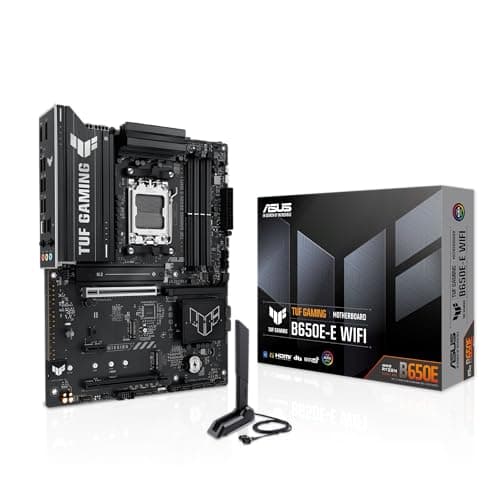 BudgetB650EASUS
ASUS TUF Gaming B650E-E WiFi
The cheapest board here that still leaves the AMD Ryzen 7 9800X3D real headroom.
Capacity used22 % · 52 °CAMD Ryzen 7 9800X3D draws 140 W of 648 W
- Socket
- AM5
- Vcore
- 8 × 80 A
- Memory
- DDR5
$139.99
as of 4 November 2026
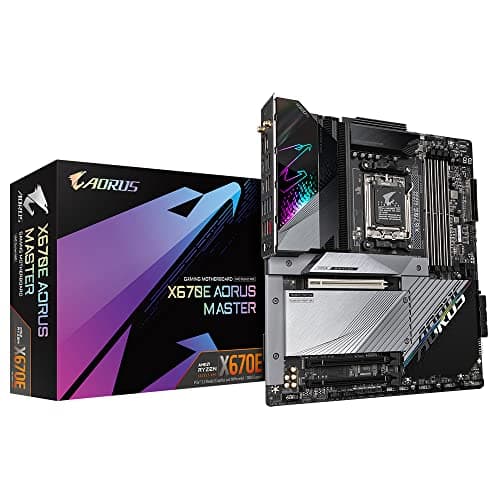 EnthusiastX670EGigabyte
Gigabyte X670E Aorus Master
The most headroom of any board in the database for the AMD Ryzen 7 9800X3D.
Capacity used7 % · 43 °CAMD Ryzen 7 9800X3D draws 140 W of 1890 W
- Socket
- AM5
- Vcore
- 16 × 105 A
- Memory
- DDR5
$499
as of 4 November 2026
The MSI MAG B650 Tomahawk WiFi
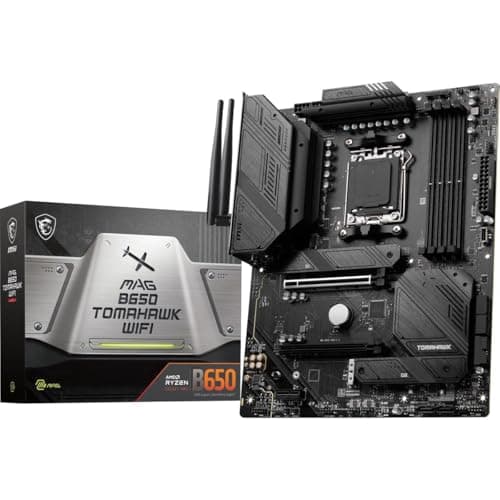
MSI MAG B650 Tomahawk WiFi
- Socket
- AM5
- Vcore
- 14 × 80 A
- Memory
- DDR5
$175.99
as of 4 November 2026
- Chipset
- B650
- Form factor
- ATX
- Vcore stages
- 14 × 80 A
- Phase design
- Doubled phases
- VRM cooling
- Heavy heatsink
- VRM tier
- Tier A
- Memory
- DDR5-7200
- BIOS Flashback
- Yes
Questions people ask about this pairing
- Will the AMD Ryzen 7 9800X3D throttle on the MSI MAG B650 Tomahawk WiFi?
No. The AMD Ryzen 7 9800X3D draws 140 W in a sustained all-core load and the MSI MAG B650 Tomahawk WiFi holds about 1260 W, so the VRM sits at an estimated 45 °C and clocks hold.
- How many power phases does the MSI MAG B650 Tomahawk WiFi have?
14 Vcore power stages rated 80 A each, in a doubled design. Counting only the core rail matters here — vendor marketing often adds the SoC and auxiliary phases to reach a bigger number, and those carry none of the CPU's core load.
- Does the MSI MAG B650 Tomahawk WiFi need a BIOS update for the AMD Ryzen 7 9800X3D?
Probably. The MSI MAG B650 Tomahawk WiFi shipped with firmware that predates Zen 5 V-Cache. It has USB BIOS Flashback, so you can update it from a USB stick with no processor installed.
- What memory does the AMD Ryzen 7 9800X3D take on the MSI MAG B650 Tomahawk WiFi?
DDR5, in up to 4 slots, validated to DDR5-7200 on this board.
- What VRM temperature should I expect with the AMD Ryzen 7 9800X3D on this board?
Our model estimates 45 °C, from 38 °C of interior case air plus the stress ratio of 0.11 scaled by 65 °C. Measured numbers move with case airflow and ambient temperature, so treat this as a band rather than a reading.